As more players reach the endgame in Arknights: Endfield, the focus has changed from progression to preparation.
With most Valley IV outposts fully upgraded and exploration largely complete, there is currently limited high-intensity content outside routine farming. Instead of waiting for the next update, some players have taken optimization to the next level.
One community member has shared a fully optimized, “future-proof” factory blueprint setup for the entire Valley IV zone, including all outposts and the Core AIC.
And the numbers are significant.
What This Valley IV Setup Produces
The full blueprint configuration generates:
- Buck Capsule [A]: 18 per minute
- HC Valley Battery: 18 per minute
- Miscellaneous items (cans, grenades, flowers, lower capsules): 6 per minute
Over time, this allows you to stockpile up to 80K of Plants, Parts, and Bottles for future updates. For players preparing for the upcoming patches, new crafting requirements, or additional content, this essentially removes resource pressure entirely. It means you will have a massive stock of everything that you can just use in the future.
Important Requirements Before You Build It
This is not a beginner setup. If you have barely started, it is not for you, but you can take a look at our beginner recommendations for blueprints here!
The following setup is for players who already have a base stock, have upgraded outposts and regions, and can mine the maximum amount of ores.
To make it work, you must:
- Unlock all area sites in Valley IV
- Fully upgrade depot bus upgrades for all three outposts
- Fully upgrade the Core AIC
- Reach Regional Development Level 11 at least to unlock high-purity mineral beds
- Actively mine every resource node in the Valley
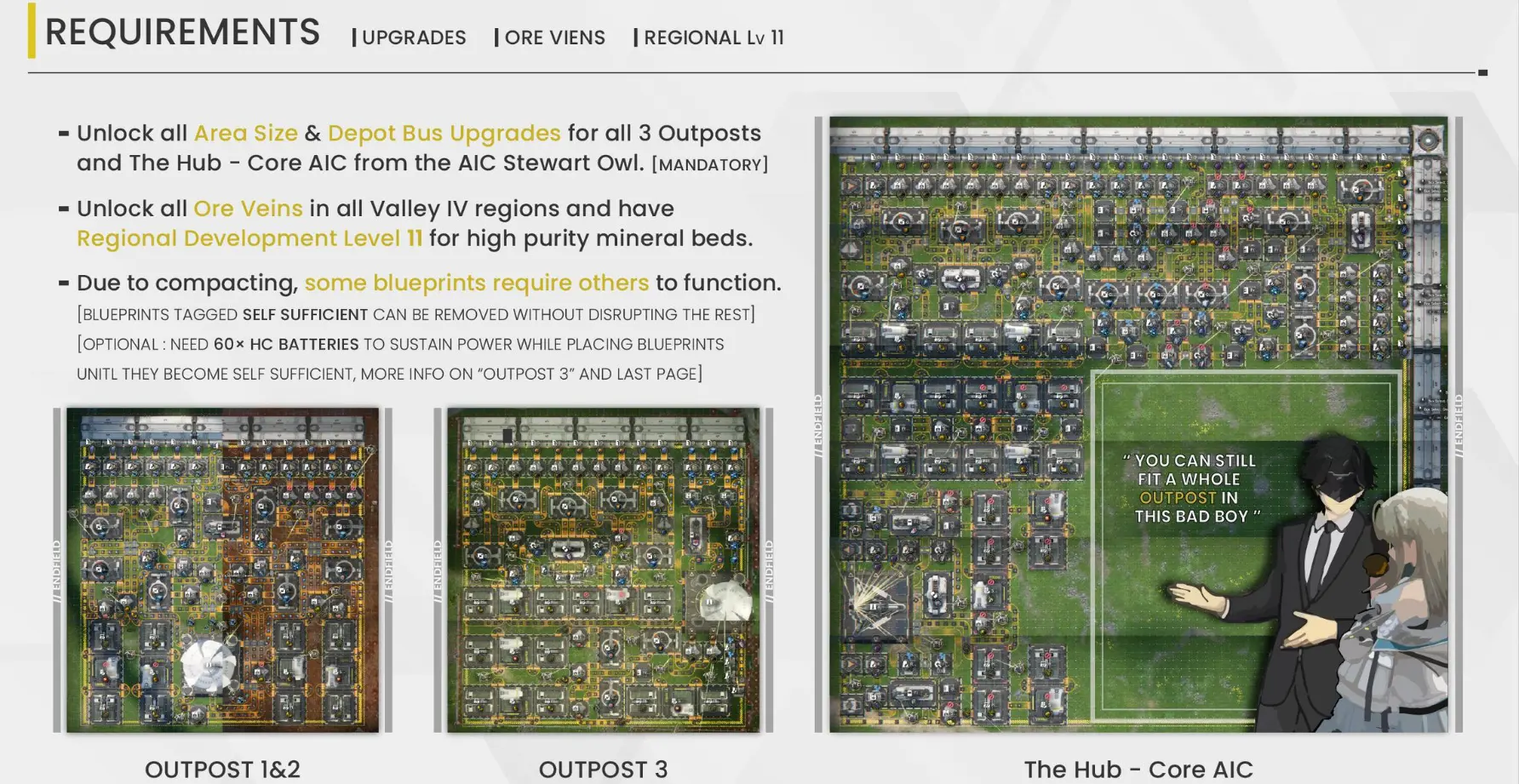
If your outposts or Core AIC are not fully upgraded, the blueprint will not fit due to space constraints. Additionally, some blueprints depend on pre-existing infrastructure. Because of compact placement, you may need an initial battery stockpile to sustain power during construction.
These layouts are also zone-specific. Certain blueprints only fit in specific outposts and cannot be swapped.
The Core AIC configuration also leaves one free slot open, allowing you to customize the setup based on personal needs.
Blueprint Codes (EU/NA Servers)
Here are the blueprints for EU and NA servers. Credit to Reddit users u/Kain_DH, u/Prior_Theme_8587, and EndfieldWorld on Twitter/X for sharing the full configurations.
- Outpost 1 & 2
- A: EFO01893iaI8UI12oUi73
- B: EFO011ea2A91O9U2634O7
- Outpost 3
- A: EFO01eE7I5Ae3A48oAi8
- B: EFO010U95e1021i1OE179
- Core AIC
- A: EFO012I403O21O8AeIOo
- B: EFO0172UoOi7ui554O0Ai
- C: EFO01A5i327Ao7E69ieO
- D: EFO01U4A8EeUIeOEi7Oa8
- E: EFO01iOeu4Ui8U2ee72U4
Blueprint Codes (Asia Servers)
Here are the blueprints for Asia servers, kindly shared by sweetiefudgies on Twitter/X:
- Outpost 1 & 2
- A: EFO013o7241uEiau20i79
- B: EFO013o7241uEiau80i7u
- Outpost 3
- A: EFO013o7241uEia990179
- B: EFO01I3A5O0o479a75308
- Core AIC
- A: EFO01u8U45aI2e0e5AIOU
- B: EFO01u8U45aI2e0e9A9OU
- C: EFO019aEuIi635e6U5OI2
- D: EFO01iUIa0Ee132aa72U4
- E: EFO012O9Aio4Ua8aoeIOo
How to Place Everything Down Properly
There are a few things you need to keep in mind when you lay out all of those Blueprints.
Outpost 1&2
Outpost 1 and 2 are the Originium Science Part and Power Plateau. You will also need to add some Electric Pylons manually on the outside of the border on both sides. Place the Outpost 1&2 B blueprint second. Everything needs to be aligned perfectly before you are able to place that one down. This means that you also need to make sure your sub-PAC is properly aligned.
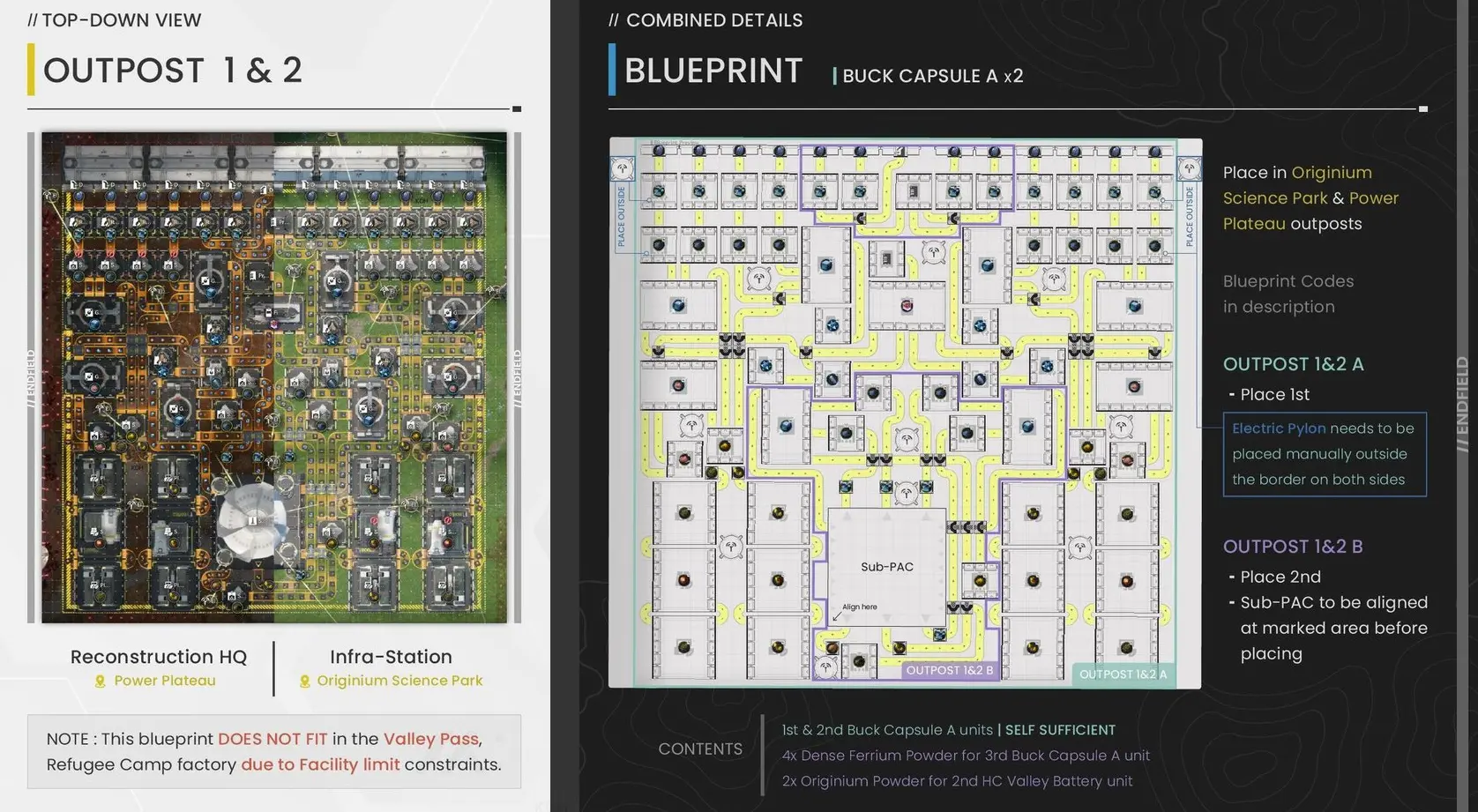
Outpost 3
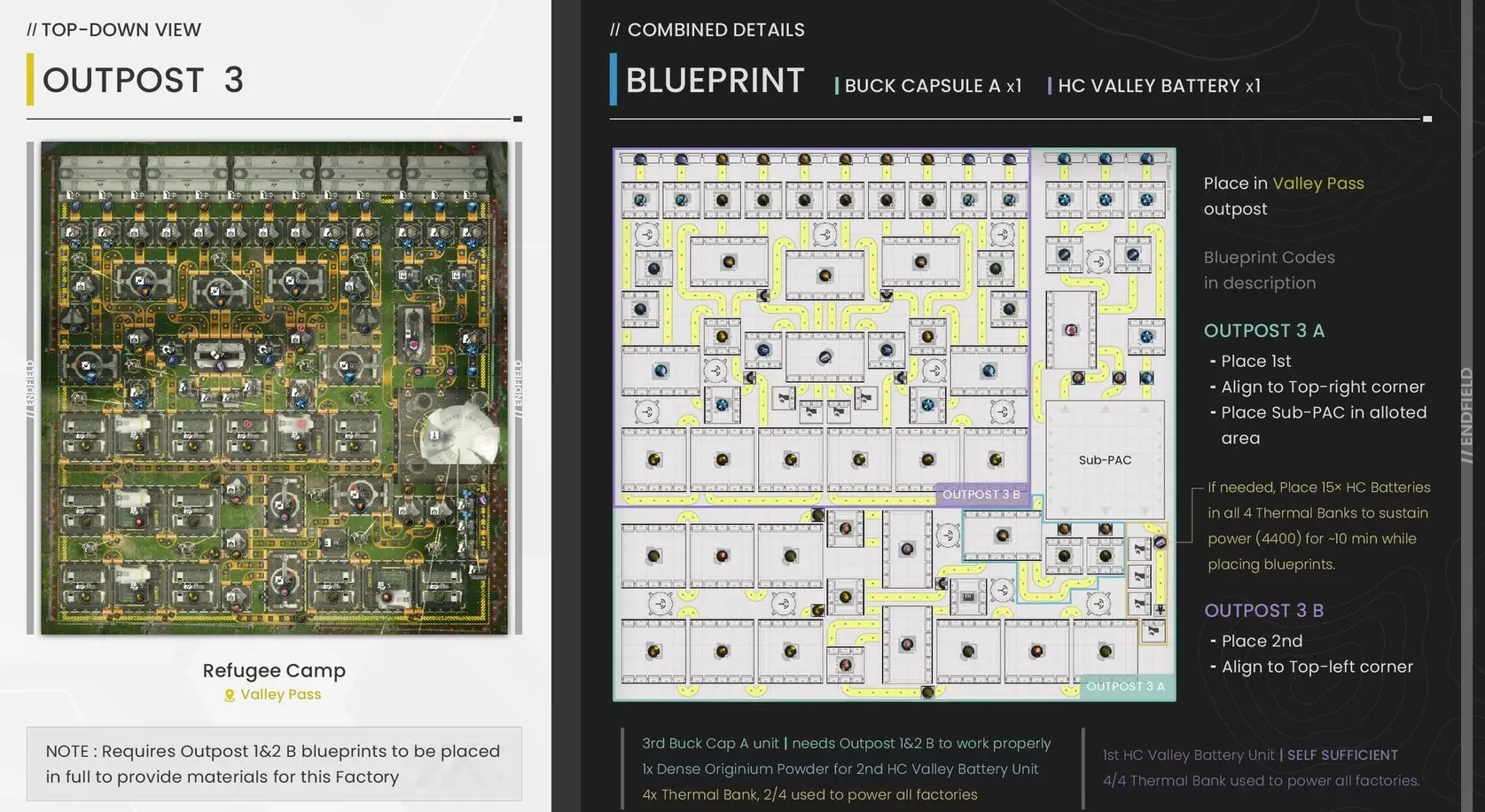
Outpost 3 is the Valley Pass outpost. In this one, you want to craft Back Capsule [A] and HC Valley Batteries.
You want to place the blueprint A first, and make sure it is aligned perfectly in the top-right corner. You then want to place your Sub-PAC as indicated in the following image. If you have a stock of Batteries, you can place some in the Thermal Banks to sustain power while you place down the rest of the blueprints.
Blueprint Outpost 3 B needs to be placed in the top-left corner.
The Hub – Core AIC
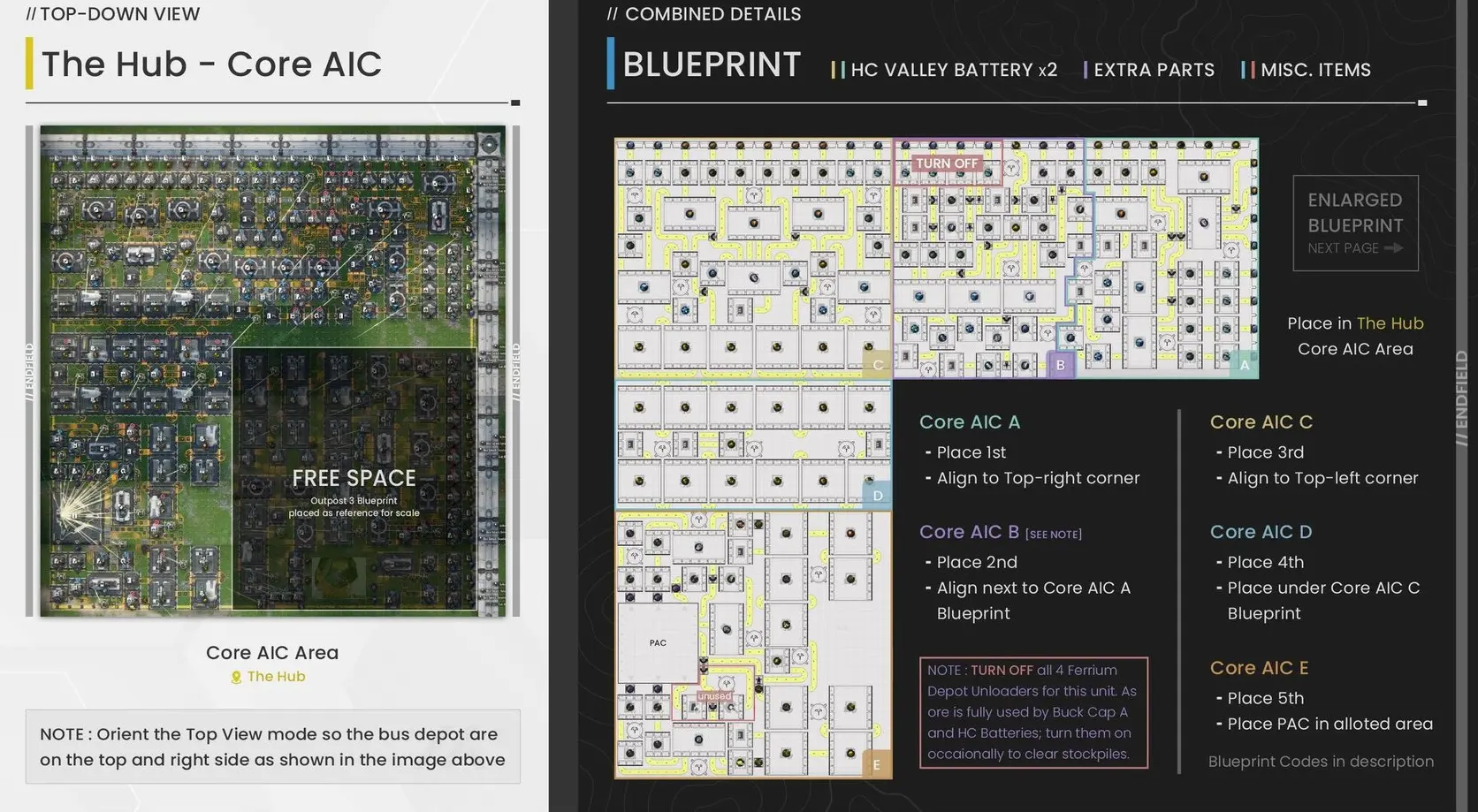
This one obviously goes into your core AIC. You want to first orient the top view so the bus depot are on the top and on your right side.
Place the Core AIC A blueprint first in the top-right corner. Again, make sure everything is aligned nicely, or some things might not fit.
Next, you want to place the Core AIC B next to the Core AIC A, BUT, make sure to turn all 4 Ferrium Depot Unloaders off for now. You want to turn those 4 on just occasionally to clear stockpiles if needed.
Once you did that, place your Core AIC C in the top-left corner, the Core AIC D under the C blueprint, and the Core AIC E last, down-left. Your PAC is not really linked to anything here, so feel free to place it where you want in the free spot.
A Factory Ready for the Future
With all of this, you are completely ready for anything that will be added in the future. It will allow you to max out Stock Bill savings and Deliveries at every outpost, and you have enough parts of everything for future recipes. On top of that, you even got a little spot left!
If future updates introduce:
- Higher crafting requirements
- Expanded development tiers
- New materials
- Additional factory mechanics
Having tens of thousands of stockpiled resources could eliminate early grind entirely.
For players who enjoy optimization and long-term planning, this Valley IV blueprint may be one of the most efficient setups currently available.
If you want to check out the complete original guide, you can also head here.
For more guides and information, check out our latest news!