With the Midnight expansion arriving in a little over a month, it is a good time to remind players of a good installation practice: Renewing the Data folder of your World of Warcraft installation! This gives you a reduced WoW folder space and faster load times. Bacon-muffin reminded people of this on Reddit.
Why Should I Delete My Data Folder?
The creator of the DeadlyBossMods addon, MysticalOS, released a video on this practice last year. You should watch the video for the full context, but as a general explanation, any Battle.net games do not effectively clean up outdated files in the Data folder. Basically, for every new version of WoW (PTR builds, etc.), certain files are duplicated during generation.
The way Battle.net handles file generation means the folder will grow over time, racking up tens of gigabytes of wasted files. Cleaning up the folder means the game will redownload itself with a shorter folder size. This also directly leads to faster load times, since the game loads fewer redundant files!
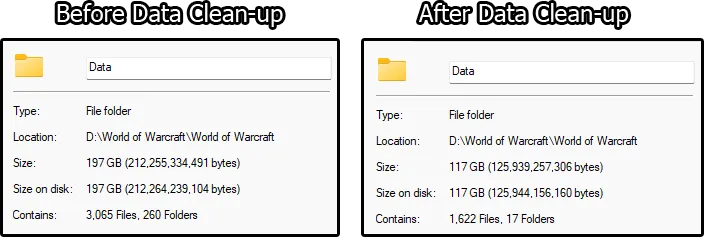
You can check an example of the results of the Data folder cleanup below:
How to Clear Your World of Warcraft Data Folder
To clean up your folder, open your main World of Warcraft installation folder. Once there, delete the Data folder. The next time you open the game, it will redownload your Data folder – A clean installation, with no duplicate files. Warning: By doing this, you will redownload a significant portion of your World of Warcraft installation. We recommend doing so only when you do not plan to play the game for a bit, as the process can take a while.
You do not need to worry about your in-game settings when doing this, as they are stored in separate folders within each game version’s installation. They will not be lost in the process.