


Season 11 of Diablo 4 has brought some big changes to Masterworking, and it is not always obvious how to handle them. Many players have shared stories of accidentally leaving items unfinished or missing important steps, so we have put together a quick guide to help you get the most out of your gear.
Masterwork Now Has a “Capstone”
Previously, reaching 25/25 quality was all you needed to max out a piece of gear. With Season 11, there is an extra step, the Masterwork Capstone.
After hitting 25/25, you need to click the extra button on the UI to apply the capstone, and that grants a bonus to one of your item’s affixes. Skipping this step means your gear is not truly maxed.
However, be careful, the game does not clearly indicate when the Capstone has been applied. After clicking to apply it, the UI still shows the same button and your available  Neathiron, so if you click again without realizing it will reroll the Capstone affix, you could lose the upgrade you wanted and have to spend more resources to get it back.
Sanctification Rules
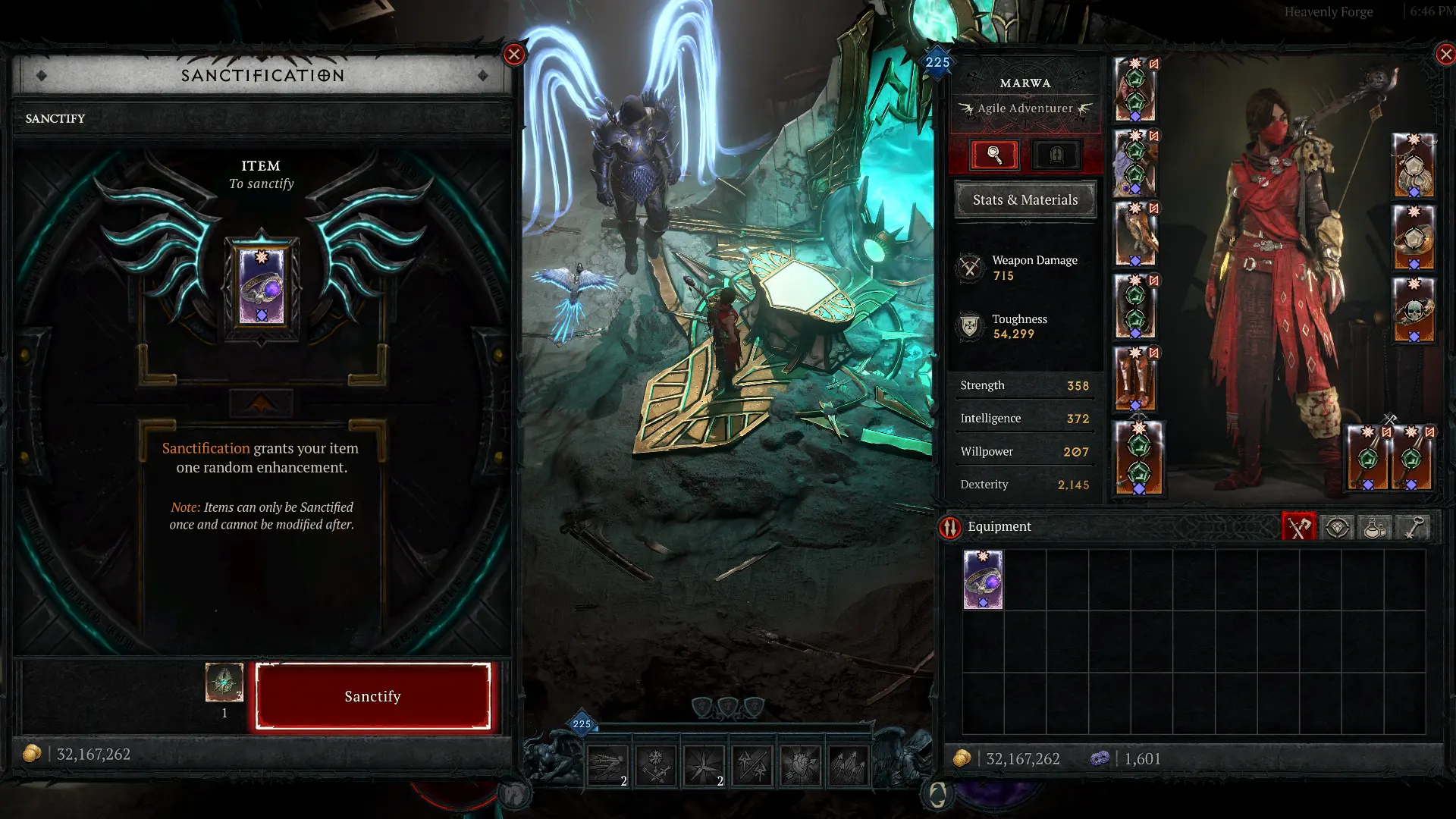
Sanctifying a piece of gear locks it completely, so anything you want to add, imprints, enchants, aspects, sockets even, must be done first. Once sanctified, you cannot reroll, temper, or add new sockets. The only exception is if your item had a socket before sanctifying, you can still add or replace gems in it.
On top of that, you need to pay attention to your timing:
- Below level 60: Sanctifying items works a bit differently. You need to use a special portal that can appear after boss kills. You only get a few free tries until you hit the endgame.
- Level 60+: Once you are at endgame, bosses and seasonal rewards start dropping Heavenly Sigils. These let you do extra sanctifications whenever you need.
Common Mistakes to Avoid
Here’s a quick heads-up on what to check before you make any mistake:
- Sanctifying too early – Make sure you have done all your tempering, imprints, enchants, and added sockets before sanctifying. Once it is done, there is no going back (except swapping gems in sockets you already added).
- Forgetting sockets – A lot of players forget to add them, which can ruin an otherwise perfect piece of gear, especially late-game stuff.
- Overlooking the Capstone – Hitting 25/25 quality is not the end. The Capstone affix is not obvious, and if you click the masterwork button again without knowing, you might reroll it and waste Neathiron.
- Not checking GA/affix rolls – Some General Affixes (GA) can really make or break your build. Make sure you are happy with them before going to the next step.
- Mass upgrading without a plan – If you are working on several items at once, it is easy to miss a step. A simple checklist helps: add the right aspect → temper → add sockets → enchant → masterwork to 25 → apply Capstone → sanctify.
Before you hit that sanctify button, make sure everything is done, because you will not be able to undo it. Doing this in the correct order saves you from costly mistakes and unnecessary farming.
The new systems give players more control and more power, but it comes with a bigger learning curve. Taking the time to understand the steps will make sure your gear truly reaches its full potential, and avoid the “oh no” moments that so many players are sharing online.
For more guides and information, you can also take a look at our Season 11 guide!