




 NEW! The Icy Veins app is here
This page will cover everything you need to know about using Raidbots to simulate (sim) and optimize your own character in World of Warcraft's Midnight expansion.
Welcome to our guide to using Raidbots to optimize your WoW character. On this page, you will find info about Raidbots in general and how to configure it more generally. If you are looking to master specific parts of Raidbots, follow the links below to their respective sections of this page.
We recommend reading the sections below before moving on to the Top Gear/Droptimizer/Advanced sections, so that you can learn about Raidbots more generally and how to set up the generic settings that are shared between all sims.
- Top Gear is the most important part of Raidbots. It lets you sim your best gear, Trinkets, Talents Gems, Enchants etc.
- Droptimizer lets you find out content you should be doing to get the biggest gear upgrades for your character.
- Advanced is a section in Raidbots that lets you do sims that are not covered by Top Gear, for example simming different Racial bonuses and more.
If you are more visual by nature and would prefer to see the contents of this guide in video format, we have an entire Masterclass on the topic, available for our Premium subscribers.
Why You Should Sim Yourself
World of Warcraft is an incredibly complex game. On top of all the mechanics and how they interact with stats like Crit, Haste, Versatility, and Mastery, there are RNG elements built into the game that will drastically change your DPS output from attempt to attempt, even without changing the way that you play.
Because of this, it is essentially impossible to draw good conclusions from old-school in-game testing on Target Dummies. With perfectly consistent play, your DPS can easily vary by 10-30% just from RNG effects alone, when min-maxing often entails DPS increases that are less than 2%.
Simulations run tens of thousands of perfectly consistent runs with various setups to try and eliminate this problem. With dummy testing, you can easily still have 5%+ variation even if you do dozens of tests. With simulations, you can achieve an error margin of 0.1% or less within seconds. It is also much easier, and you can rely on the robot to play the spec perfectly and consistently.
Simulations take ALL in-game spell interactions and mechanics into account, including RNG. In fact, you can even use simulation data to draw statistical analysis on results, and for example work out what the highest "possible" DPS may come from. For example, stacking a lot of random proc effects might cause the simulation to have one run in a thousand where all of the procs activate at the same time, leading to a massive surge in DPS for that pull.
Simulations are used by Theorycrafters, Guidewriters, World #1 Raiders, and completely normal players alike, and we highly recommend that you join them.
How To Sim Yourself in Midnight Season 2
Simulating or "simming" yourself is one of the most important tools for improving your character, especially as a DPS player.
If you have ever visited a Class Discord, you will often have seen people referring to "simming" yourself. On this page, we will introduce you to what it is, and how you can do it yourself to maximize your DPS.
SimulationCraft and Raidbots
SimulationCraft is a tool that has existed for almost 20 years. It is essentially a WoW Simulator that perfectly models all abilities and their interactions in the game by reading the game's actual spell data.
Theorycrafters and Guidewriters have been using this tool for years to work out the best ways to play the game. Since the in-game environment is perfectly modelled, this tool can be used to test anything from different stats, rotations, trinkets, Legendaries, and much more. None of our guides on Icy Veins would be as accurate as they are without the use of tools like this.
One of the biggest benefits of a simulation tool like SimulationCraft is that you can draw conclusions from it that are based on thousands of simulated fights. You can simulate 10000 5-minute fights in a matter of seconds. That would take over 800 hours of hitting a target dummy to replicate. The simulation is also perfectly consistent, meaning that there is no human element that may alter results. Also, the rotation that simulations are executing by default is nearly perfect.
What is Raidbots?
Raidbots is a website created by Seriallos. It essentially takes SimulationCraft, which is a powerful but complicated tool and turns it into a user-friendly website where all of the most useful possibilities of SimulationCraft can be harnessed by just about anyone.
In other words, Raidbots is SimulationCraft. The only difference is that all of its features are configured through a graphical user interface, and that the simulations themselves are run on Raidbots' own, powerful servers. Running SimulationCraft on your PC is much slower and more stressful for your PC.
The Raidbots website and how to use it will form the majority of this guide, but it is still worth understanding what SimulationCraft is, which is the foundation of Raidbots. Everything Raidbots does is just SimulationCraft underneath.
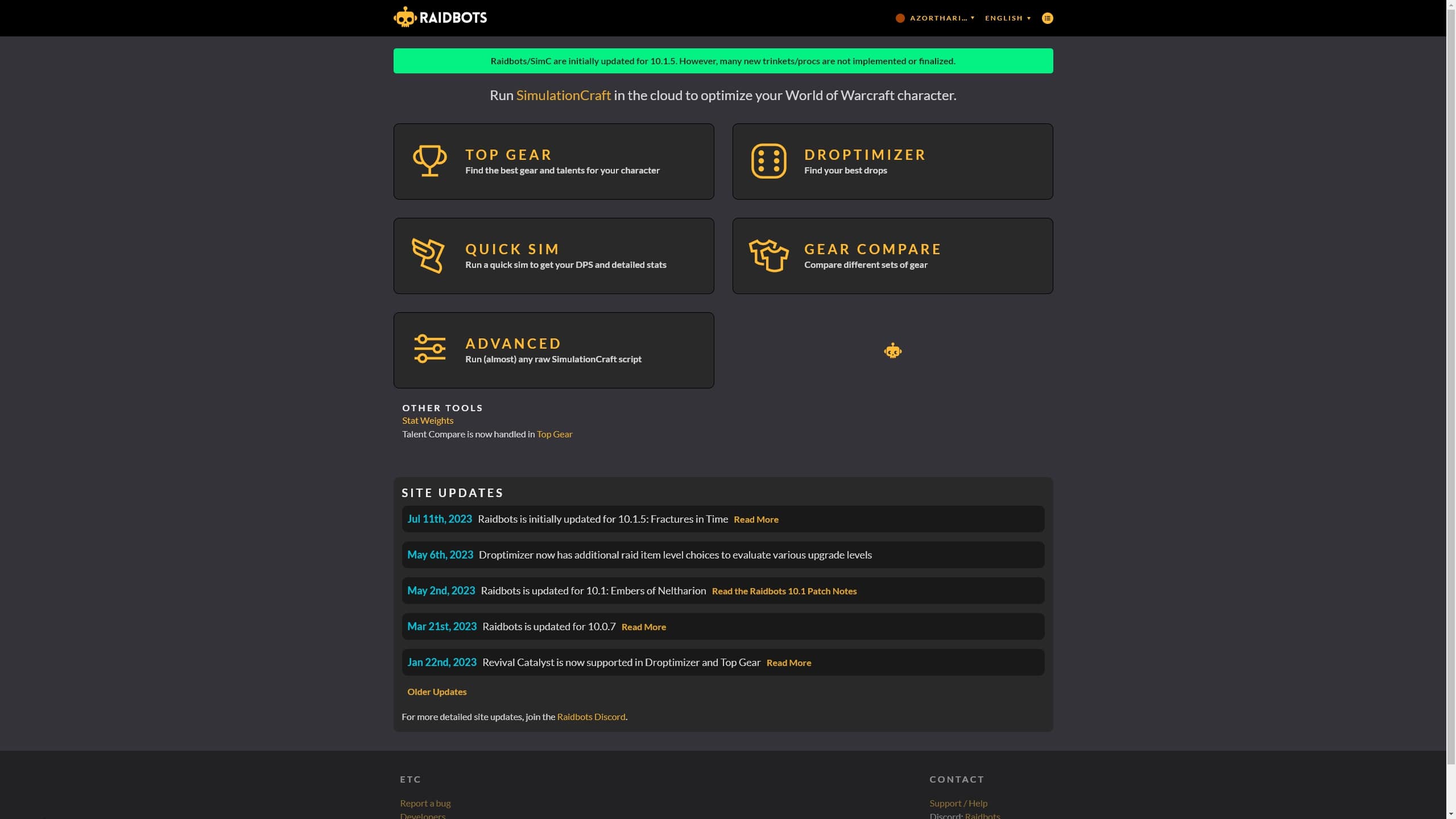
The frontpage of Raidbots contains all of the sections you need to start simming your character. We will go through all of the useful ones and how to use them in the sections below.
Step 1: Importing your Character
Every time you want to sim something new, you will need to import your character.
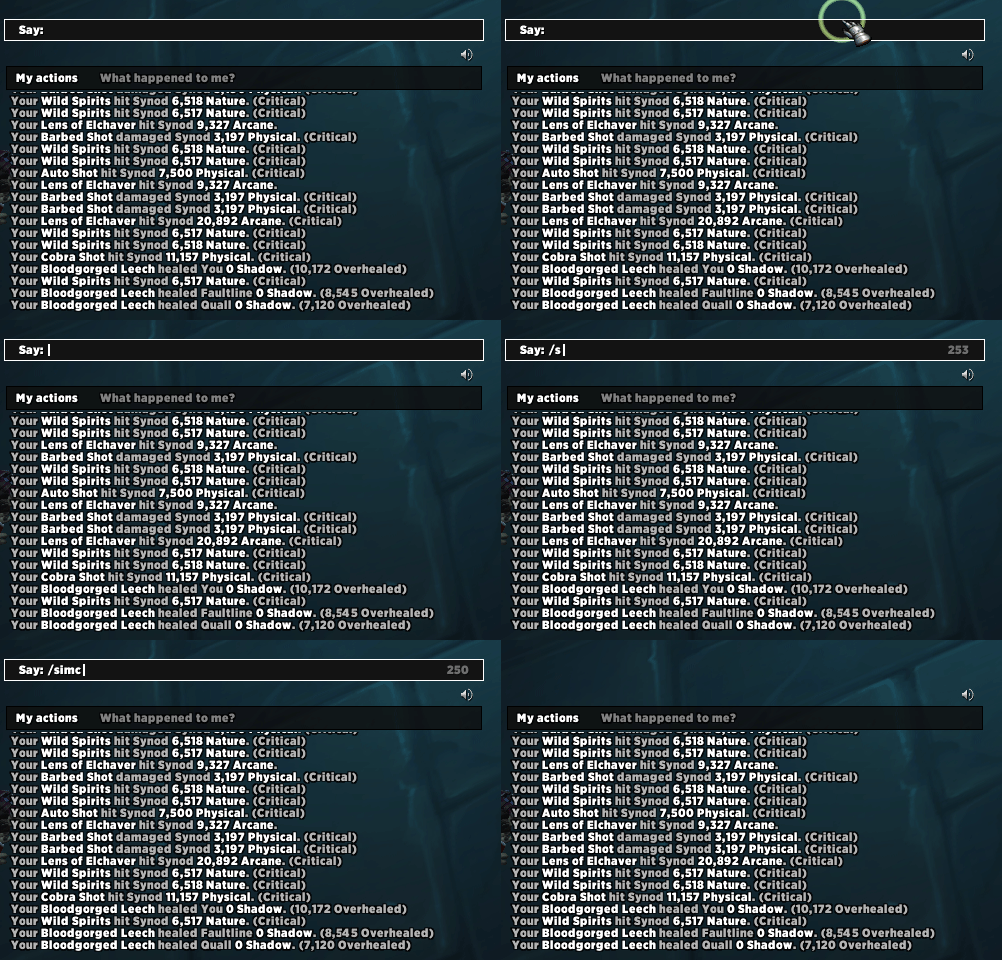
- Make sure that the Simulationcraft AddOn is installed and enabled.
- Open your chatbox and type in /simc.
- Now that the SimulationCraft window is opened, hit Ctrl+C on your keyboard to copy your data.
- Open up Raidbots Top Gear and paste in your data from the addon.
How To Configure Raidbots
Before we do any actual simming, we should make sure that we have set up Raidbots correctly for our uses. If you enter a section such as Top Gear and scroll to the bottom, you will see a lot of different options.
Fight Style
Fight Style is the actual kind of encounter that the sim will try to emulate. The default is Patchwerk, and we recommend sticking with that for most Raiding. Patchwerk is a simple 5-minute encounter with no movement. You can generally get advice on the best Fight Style to use for your Class/Spec, on your Class' Discord Server.
Dungeon Slice
The DungeonSlice Fight Style is Raidbots' best attempt at trying to emulate a section of a Mythic+ dungeon. It has a variety of target counts, including a 2-minute boss encounter. Many Theorycrafters do not recommend using it, but it highly depends on the spec you are trying to sim for.
CleaveAdd
CleaveAdd is a useful and rather simple Fight Style that lets you mix up two different target counts. The CleaveAdd Fight Style is essentially Patchwerk, but for roughly 60% of the sim's duration, it will have one additional target active. So CleaveAdd @ 2 Targets will result in 2 targets for 40% of the sim's length, and 3 targets for 60% of the sim's length.
HecticAddCleave
HecticAddCleave is a very intense encounter with frequent, numerous add spawns and heavy movement. We do not generally recommend using it, as the amount of AoE is unrealistically high for Mythic+ and most SimulationCraft Modules for Specs do not realistically handle movement.
Number of Bosses
Number of Bosses is the amount of targets that your sim will be fighting. This is helpful for doing AoE sims. For a regular Patchwerk sim, this will simply spawn multiple static bosses for your character to fight.
Fight Length
Fight Length is the amount of time that the encounter will take, give or take 20%. This means that a "5-minute" Fight Length will actually be thousands of 4-6 minute fights, but that the average Fight Length will be 5 minutes. Set this to whatever suits the fight you are doing, but if you are unsure then 5 minutes is a good default.
SimC Version
SimC Version adjusts how up to date that you want the SimulationCraft used by Raidbots to be. We recommend setting this to Latest at all times, only changing to Weekly or Nightly if you suspect that there may be a bug with the sim.
Iterations per Actor should be set to Smart Sim and never changed unless you know what you are doing.
Raid Buffs and Consumables let you choose which Raid Buffs and Consumables the sim is going to assume that you have. For example, if you are trying to save Gold and you are not using Potions or Augmentation Runes, then you should disable those. If your group does not have a Mage, then disable Arcane Intellect, and so on. You should set this to what is most realistic for your situation.
Detailed SimC Report can occasionally be useful for deep-diving into the Sim Data, but is generally not necessary. It does not add a lot of extra time to the sim, however, so you may as well just enable it.
How to Use Raidbots Top Gear
The Top Gear section is by far the most important, and most commonly used section on Raidbots.
This is where you will find out what Gear, Trinkets, Enchants, Gems, and even Talents that you should use. The vast majority of people will never need anything except Top Gear.
There are so many things to do with Top Gear that we have created a dedicated page below for it.
How To Use Droptimizer on Raidbots
Droptimizer is a feature on Raidbots that lets you sim all the drops from a Raid or Dungeon on any difficulty/Mythic+ level, to see your biggest upgrades from it.
This is extremely useful for figuring out where your priorities should be for gearing up. It is also widely used by high-end guilds to decide on their roster for farm bosses, to make sure that as many people get good items as possible.
- Use Step 1 to import your character into Raidbots.
- Select the Item Source that you want to try, for example The Voidspire.
- Choose an appropriate difficulty, for example Mythic The Voidspire.
- Press the Run Droptimizer button.
- Wait for the Sim to finish.
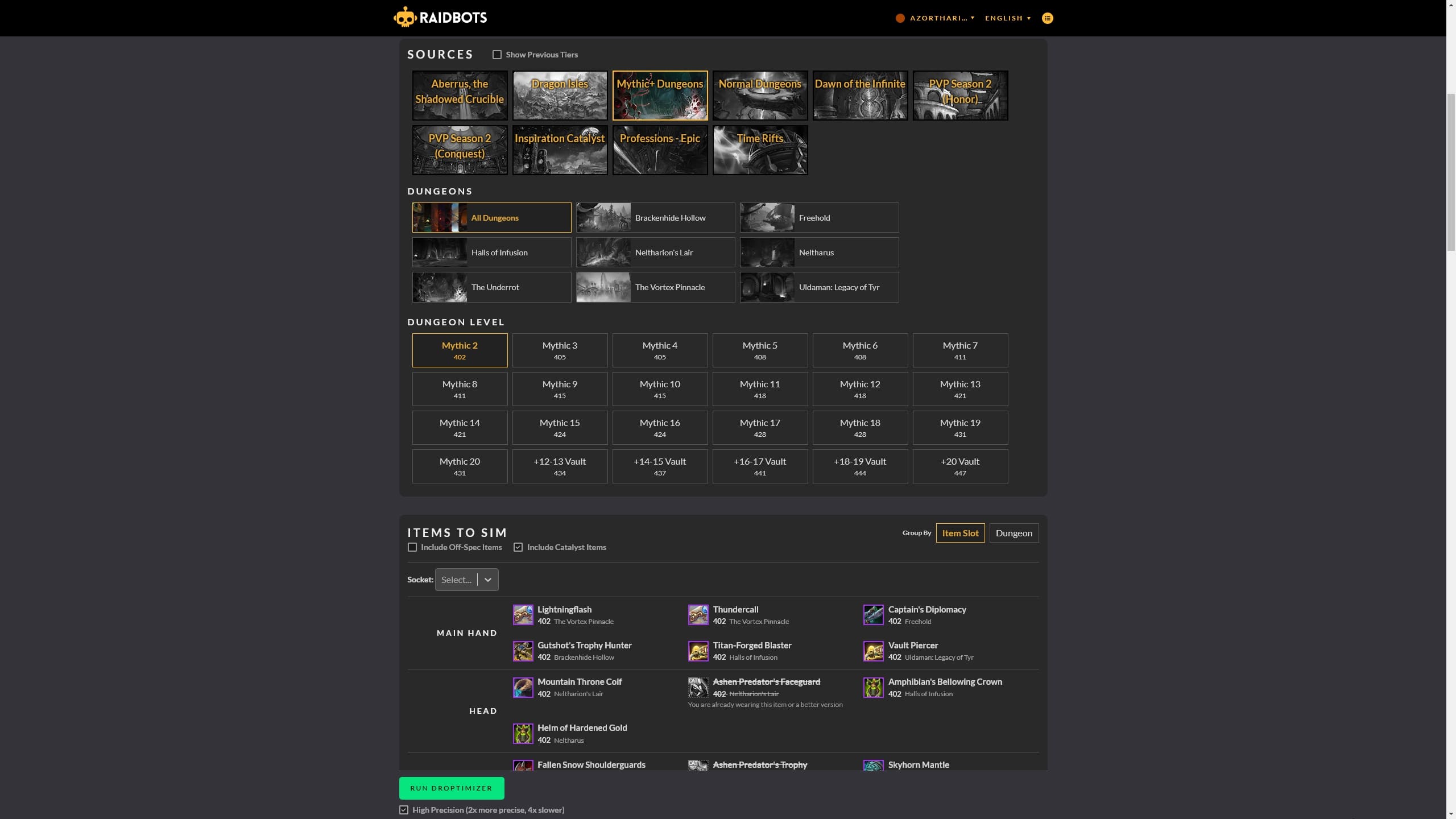
In the example above, I have chosen Castle Nathria. You might also notice that Droptimizer automatically does not sim items that I already have to save time on the sim.
There is also a Socket option. Just like Top Gear, you can choose to add Sockets to the items being simmed so that they are compared more accurately to existing items you have that may already be socketed.
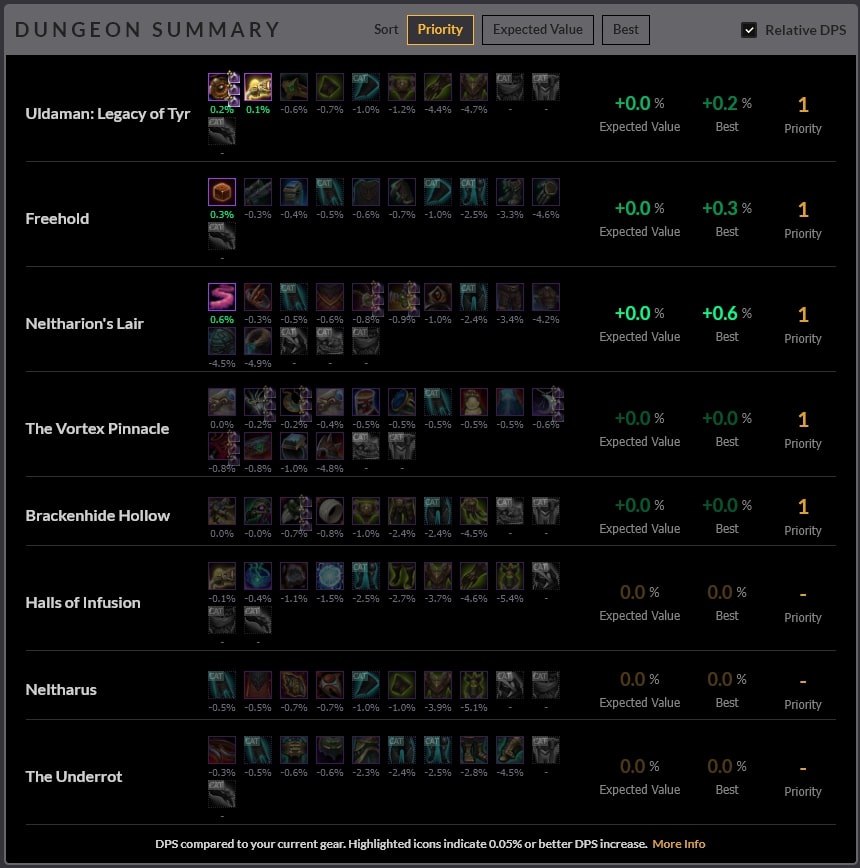
As you can see, by far the most important loot dungeons for me are Uldaman, Freehold, and Neltharion's Lair. Uldaman has two smaller upgrades, while Freehold and Neltharion's Lair each have one, larger upgrade.
How To (Not) Use Stat Weights on Raidbots
Stat Weights are one of the most popular, but also one of the most misused features on Raidbots.
In simple terms, it tries to give you the DPS value of each stat right now, to give you an idea of what your best stat to stack currently is, but it has a lot of problems and we do not recommend using it, since it provides no advantages over using Top Gear, so we will dedicate this section mostly to why you should not use it.
The way your stat weights are calculated is as follows:
- It gives your character X of each stat, the exact number varies by season.
- It looks at the DPS increase from giving your character X, let's say 500, of each stat. For example, let us say that 500 Haste gives me 8K DPS.
- It divides the DPS gain by X. So 8000 divided by 500 is 16.
- Thus my Haste Stat Weight is 16, because it has figured that each point of Haste increases my DPS by 16, on average.
This seems sensible enough on the surface, but the problem is the "Scale Delta" used, which is the amount of stats that it gives you to make this calculation. When working with secondary stats - often in the form of Gems and Enchants, we are working with much smaller increments. You will rarely be swapping items, gems, or enchants in a way that would swing your stats by such a large margin in one go.
The second problem is that Stat Weights, at least by default, are purely using a Positive Scale Delta. That means it is only giving your character stats and working out the DPS increase, but it is not doing the inverse, which would be REMOVING stats from your character and looking at the DPS loss.
These factors combined with the fact that Top Gear can do everything that Stat Weights does without any need for interpretation or calculation means that you should generally not use Stat Weights at all as a normal user.
How To Use Quick Sim on Raidbots
This section is very straightforward. Quick Sim does not let you compare things, but it just lets you see at a glance how much DPS that you sim for. This is useful when comparing yourself to others to get an idea of how good your gear is. It also gives you some detailed information about the sim, such as the DPS% contribution from each ability and so on.
How to Use Raidbots "Advanced""
The Advanced Section is the Raidbots Sandbox. Here, you can do everything that SimulationCraft can do, but there is no Graphical User Interface to help you out. To harness the Advanced section, you need to understand how to configure SimulationCraft via text options and commands.
In this section, we will cover some of the most useful things you can do with Advanced to take your simming to the next level.
How To Sim Racial Bonuses in Raidbots
If you are really trying to min-max, you may have considered changing your character's Race to harness the power of certain Racial Bonuses. With a Racial Bonus Sim, you can sim all of the Races to see the best Racial for DPS.
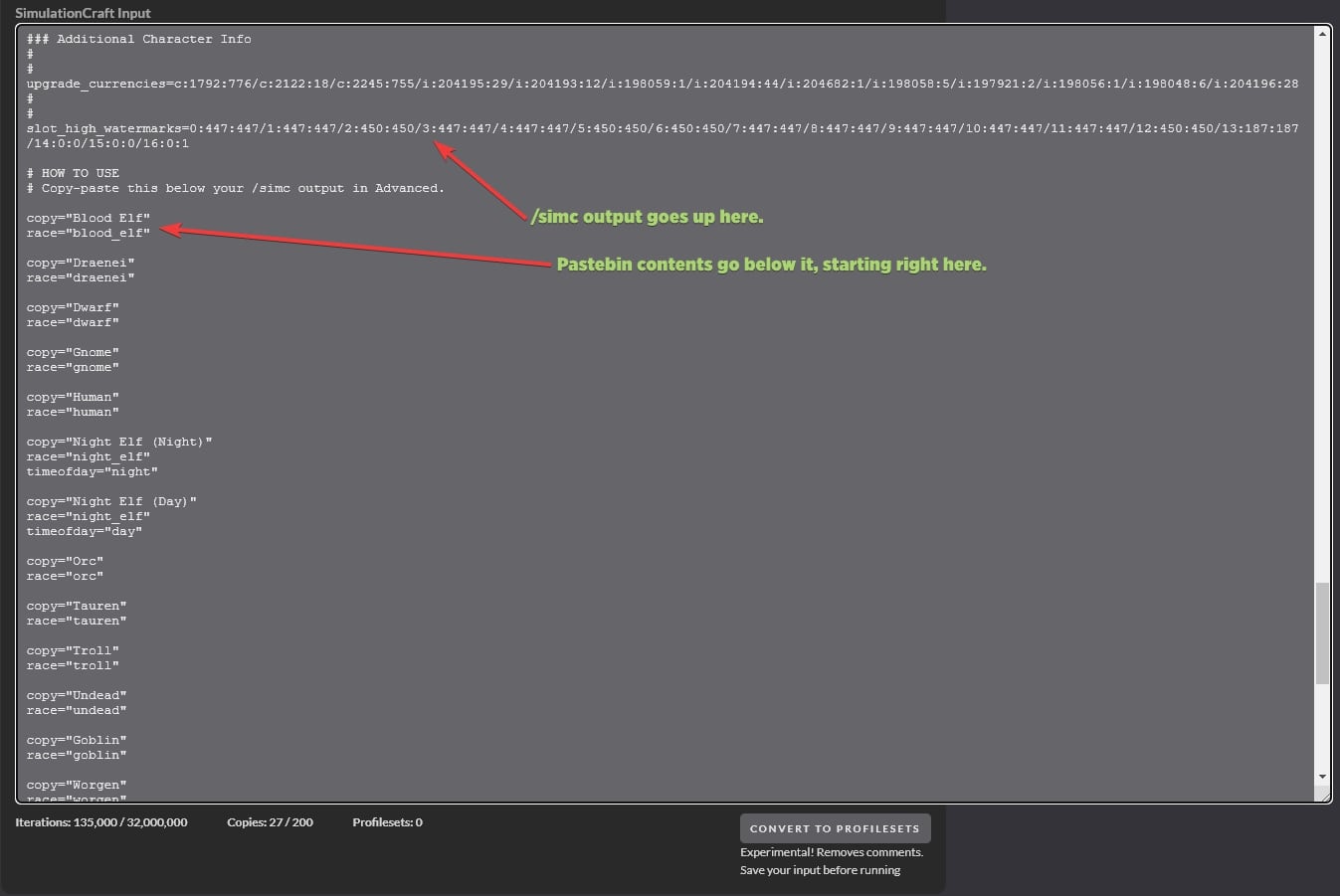
- Use Step 1 to import your character into Raidbots. Simply paste the SimC Output into the large text box.
- Visit this Pastebin and copy its contents.
- Go back to Raidbots and Ctrl+V the contents of the Pastebin below the SimC Output that you pasted in Step 1.
- To make the sim run quicker, enable Convert to Profilesets. This prevents you from doing certain analysis on the results, but makes the sim run much faster.
- Click the Run Simulation button.
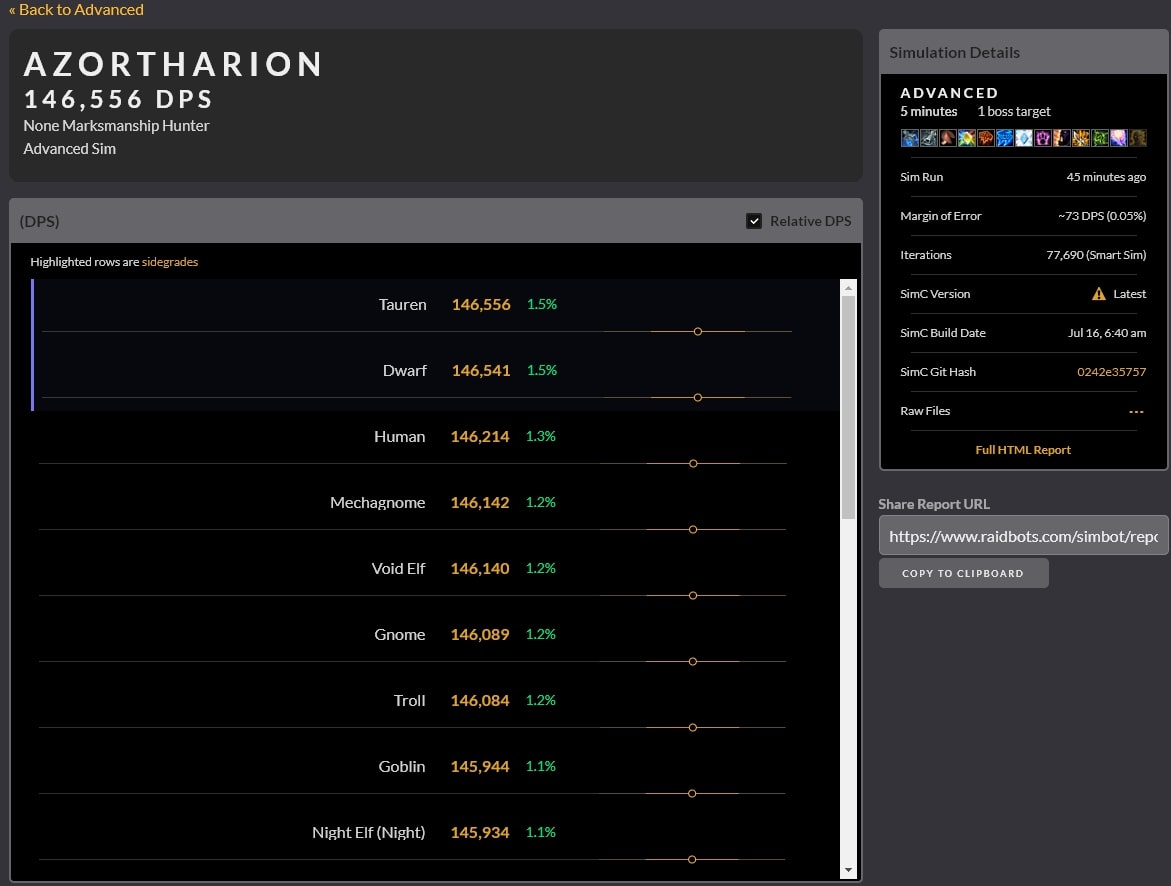
Dwarf and Tauren have the same DPS Racial, so their nearly equivalent status is expected. However, just behind you find Human, Mechagnome, and Void Elf all within 73 DPS of each other, which is the Margin of Error on the right- hand side. Therefore, for all intents and purposes, these Races can be considered equal DPS!
How To Sim Fixed Fight Lengths on Raidbots
As we explained earlier, whenever you set a Fight Length in Raidbots, it is not actually the exact fight length that the sim will run, because simulations have a 20% fight length variation by default. A 5-minute sim will thus be a collection of sims that are 4-6 minutes long, with the average sim being 5 minutes long.
This can be inconvenient if you know exactly how long a fight is going to be, particularly if you are trying to do Target Dummy practice. Below, we will show you how to sim a specific fight length, with no variation.
How To Remove Fight Length Variation from Raidbots/SimulationCraft
Above or below your sim profile in the Advanced section, enter the following:
- # Set XXX to your desired average fight length in seconds. For example, 300 would be 5 minutes.
- # Set YY to your desired fight length variation in percent. For example, "25" would be a 25% fight length variation.
- max_time=XXX
- vary_combat_length=0.YY
- fixed_time=1
How To Practice Your Rotation with Raidbots
An underrated possibility with Raidbots is that you can actually compare your own gameplay to the sim and see where you fall behind in terms of casts.
Use the following to set up a "Target Dummy"-style sim with no buffs that is exactly 3 minutes in length.
- # Set XXX to your desired fight length in seconds. For example, 200 would be 3 minutes and 20 seconds.
- max_time=XXX
- vary_combat_length=0.0
- fixed_time=1
- optimal_raid=0
- potion=disabled
- flask=disabled
- food=disabled
- augmentation=disabled
Put the above string of text before or after your actual /simc output, and then run the sim.
By pressing Full HTML Report on the Results page, you can get a detailed breakdown of the sim. Most importantly, you can look at the Abilities'Execute tab to see the amount of times that each spell was cast. You can compare your own casts to these to learn how the sim is playing differently.
Is Raidbots Premium Worth It?
If you have used Raidbots, you may have noticed that there is an option to support Raidbots' Patreon and get some perks. The most notable perks include skipping the queue when you sim, and having a much higher iteration count allowance, allowing you to sim more different things in one go.
Whether this is worth it is up to you. It is by no means necessary to get almost everything you would ever need out of Raidbots, but it does save you time and if you sim a lot, it is well worth considering.

Changelog
- 31 Mar. 2026: Updated for Midnight expansion.
- 19 Sep. 2023: Updated certain commands for simming yourself on dummies.
- 16 Jul. 2023: Updated the guide for Dragonflight Patch 10.1.5
- 19 Apr. 2021: Expanded the Advanced section with tips on how to use Raidbots to practice your rotation on dummies.
- 31 Mar. 2021: Made a formatting change to make the Gear Compare section easier to find.
- 21 Mar. 2021: Updated the macro to prevent Inscrutable Quantum Device from proccing Execute damage.
- 10 Mar. 2021: Page added.
